


Seconds, not swipes
There is no feed to approve and no profile to grind through. Press the button and the next person online is in front of you.
Thunder Chat · thunderchat.live
 Live nowTays🇮🇹
Press start and the next person online appears on live video — a private 1-on-1 conversation, right in your browser, no app. Talk to strangers by video, voice or text, skip when you like, and your first calls are free.
Talk to strangers
Most places to talk to strangers online hand you a profile, a bio and a typing indicator — a random video chat site should hand you a person, and Thunder Chat does. Press start, watch matching search for a second — you can already see who is about to appear — and the call opens on live video the moment it connects. Random matching means you never pick from a list unless you want to; the next person online simply finds you.
Strike up a call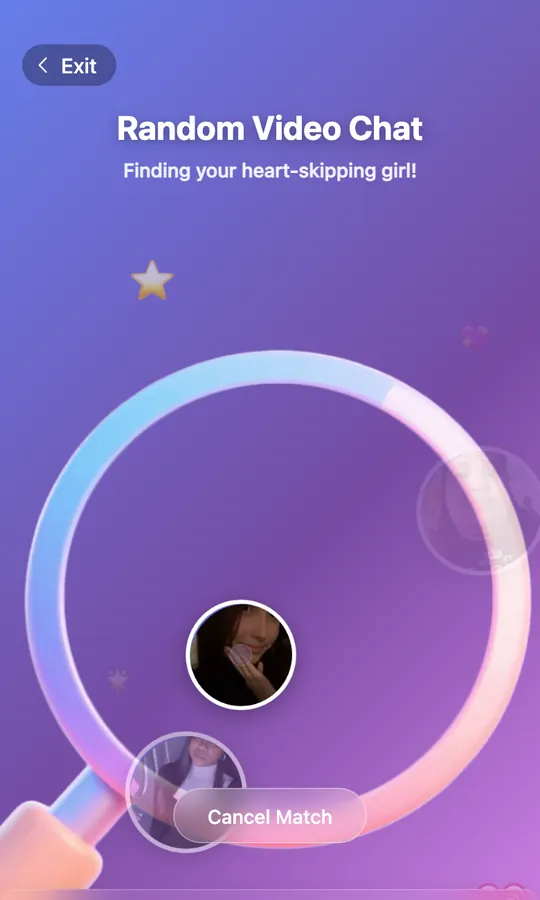
1-on-1 video call
Every conversation here is a private video call between exactly two people. There is no public chat room, no audience and nobody joining halfway — the only way in is to be matched or to call someone from her page. The online list shows everyone live this minute with her country, languages and level; tap the camera button on a card and the 1-on-1 video call starts from there.
See who is online now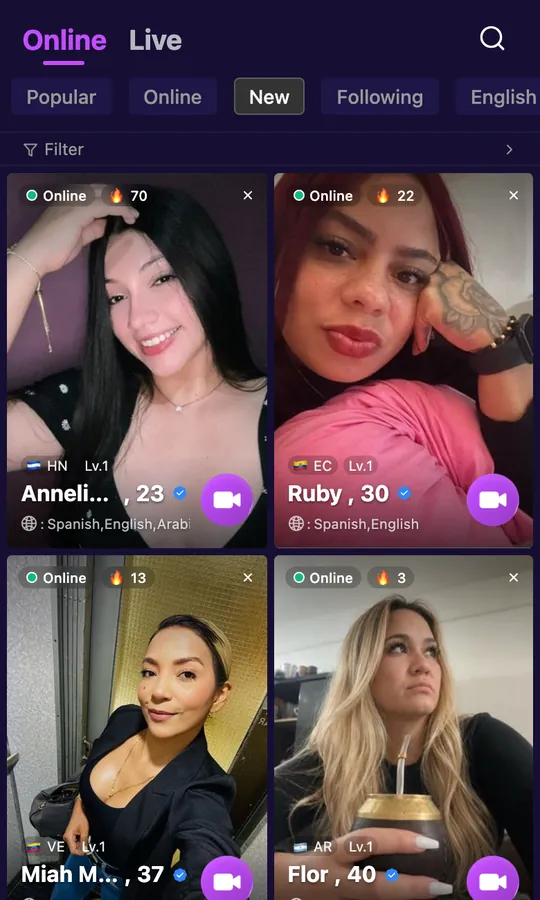
Live video chat
A stranger video call on Thunder Chat is live from the first second: your browser connects you directly, so there is no download and no waiting room. Video chat with strangers in real time — skip when it is not clicking, stay when it is — and every live video call is two people only. Random video chat, voice or text, the live video call ends when you say so: Report and Block sit inside it, one tap away, and nothing stays on your device.
Strike up a call Nube🇨🇱
Video chat with women
Video chat with women who are online right now, one conversation at a time. Profiles show where she is, what she speaks and her short videos; you can open one from the list and start a video call with women you choose, or let matching pick for you. Either way it is a private 1-on-1 call, not a broadcast you watch from the back.
Strike up a call Katy🇻🇪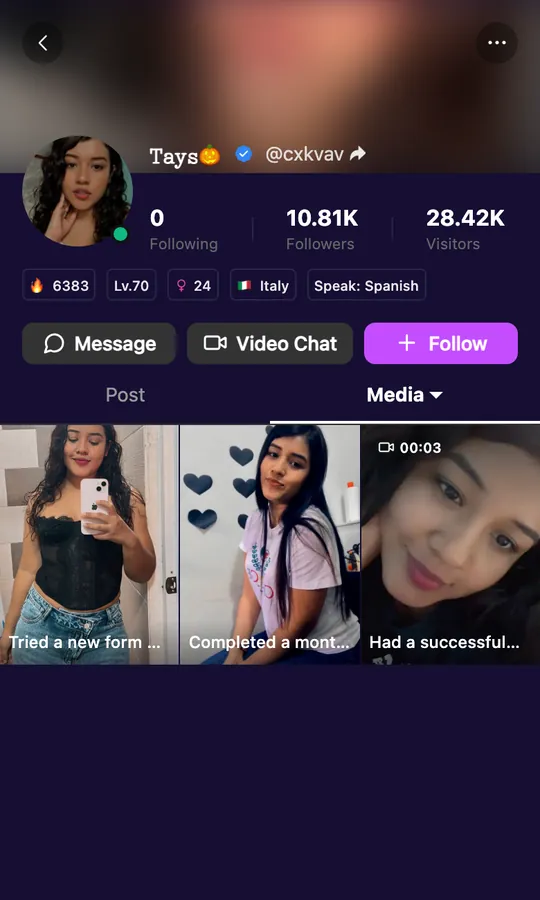
Her profile
Tap any portrait on this site and this is what opens: not a card, a profile. Here is what each part of it tells you.
The numbers at the top are hers — how many people follow her and how many have dropped by. A quick read on whether she is active or brand new.
The chip row tells you where she is, what she speaks, her level on the platform and her age before you tap anything.
Three buttons, three ways in: send a text first, start a 1 on 1 video call straight from her page, or follow and find her later in your list.
Her own photos and short videos, with captions. Scroll them before you call — you will already have something to talk about.
How it works
Four steps from the start button to a live face, and three ways to have the conversation. The mode switch sits right under the start button on the screen beside this.
thunderchat.live works in any browser on a phone or computer. No download, no account to begin.
Allow the camera and microphone once. Matching searches for the next person who is online right now.
The call opens on live video for both of you — a private 1-on-1 conversation, nobody else in it.
Stay as long as it is good. One tap moves to the next person; Report and Block are inside the call.
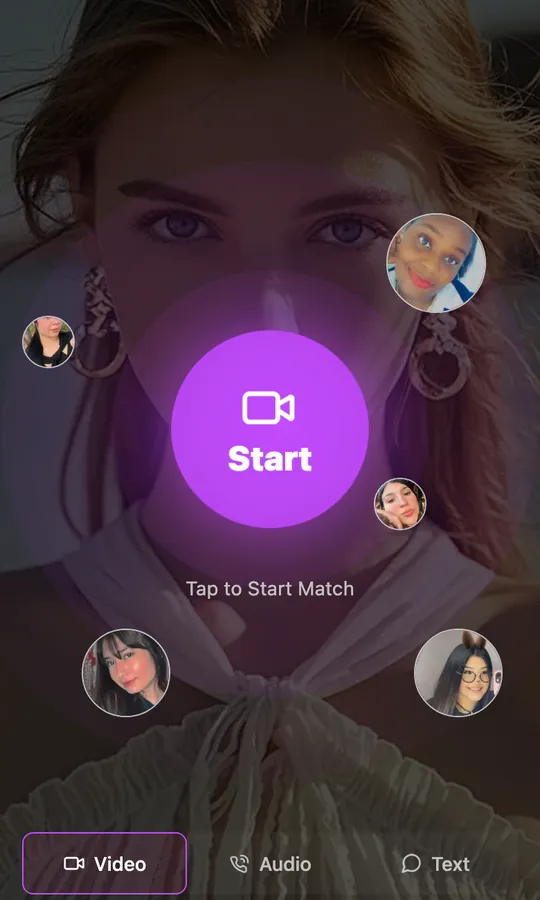

Before you press start
Between calls there is a feed of short videos from the women you can reach — like, follow, or tap "Call her" while the clip is still playing. Whatever you tap, these four hold.
There is no feed to approve and no profile to grind through. Press the button and the next person online is in front of you.
The site is 18+ and moderated around the clock. Anything that breaks the rules is a tap away from being reported.
Close the tab and the call is gone. Nothing is saved on your device and nobody gets your number or location.
Skip, end, report or block whenever you like. The conversation lasts exactly as long as you want it to.
Questions
The short version of everything people ask before their first random video call. Still unsure? The help center goes deeper.
Thunder Chat (thunderchat.live) is a random video call site. You press one button, your camera opens and you are connected with a stranger who is online right now, one on one, in your browser. You can talk by video, voice or text, skip to the next person whenever you like, and end the call at any time.
Yes. Your first matches cost nothing and no card is asked for. After the free matches are used, calls are paid with coins so you only pay for the minutes you actually spend talking — there is no subscription.
Yes. Thunder Chat runs in a normal browser on a phone, tablet or computer. Nothing is installed, and you can begin without an account — create one later only if you want to keep favourites and coins between visits.
Press start, allow the camera once, and matching connects you with one person who is online. The call opens on live video for both of you. There is no room and nobody else can join — when the conversation ends, one tap moves you to the next person.
Yes. The people online are listed with their country and language, and matching connects you with women who are live at that moment. You can also open a profile from the list and start a 1-on-1 video call directly from there.
That is what the site is for: talk to strangers online by video, by voice with the camera off, or by text first. Every mode goes through the same matching and the same privacy — one stranger at a time, never a public room.
No. ThunderChat (thunderchat.live) is an independent service and is not affiliated with Thundr or any other random chat brand. If you are comparing sites, our guide to Thundr alternatives goes brand by brand.
Online now
Open Thunder Chat and the next conversation starts the moment you press the button. Free to begin, 1-on-1, nothing to install.
Strike up a callFree to start · 18+ · no download
 Tays🇮🇹